

Is Your QA Automation Strategy Optimized?

AgileVerify
The effectiveness of your QA automation hinges on how well it’s optimized. As software complexity grows, so does the importance of a streamlined QA Automation strategy. To leverage QA automation to its fullest potential, here are a few things you may want to consider in your automation strategy:
1. Know What to Automate: Prioritize Tasks That Truly Benefit from Automation
Automation can save time and effort, but not every task is suitable for automation. Focus on tasks that are repetitive, time-consuming, and prone to human error. Examples include:
- Regression Testing: Automating regression tests ensures that new code changes do not break existing functionality. This is especially useful for large applications where manual regression testing would be impractical.
- Smoke Testing: Automating smoke tests helps quickly verify that the basic functionalities of an application are working after a new build or deployment.
- Performance Testing: Automated performance tests can simulate multiple users and check how the application performs under load, which is difficult to achieve manually.
Example: Automating Regression Tests
Imagine you have an e-commerce platform where features like product search, cart management, and checkout are frequently updated. Manually testing all these features after each update would be time-consuming and error-prone. By automating regression tests, you can quickly verify that existing features still work as expected after any code change. For example, using Selenium WebDriver, you can script the following test scenario:
This script can be executed automatically every time there’s a code update, ensuring that the product search functionality remains intact.
2. Design First Principle: Emphasize Sustainability and Reusability in Your Automation Design
When designing your automation framework, focus on creating a sustainable and reusable structure. This involves modularity, maintainability, and scalability.
- Modular Design: Break down tests into smaller, reusable modules. This makes it easier to update and maintain tests.
- Data-Driven Testing: Separate test data from test scripts, allowing the same test script to run with different data sets.
- Keyword-Driven Testing: Use keywords to represent actions, which can be reused across different test cases.
Example: Modular Design in Automation
Consider a login test for a web application. Instead of writing the login steps in every test case, create a reusable login function. This way, if the login process changes, you only need to update the login function rather than every test case that involves logging in.

Here, the login function is reusable across multiple test cases, ensuring consistency and reducing redundancy.
3. Clean Code: Strive to Write Clean, Maintainable Code
Clean code is crucial for maintaining and scaling your automation tests. Follow coding standards and best practices to ensure your code is readable and maintainable.
- Consistent Naming Conventions: Use meaningful and consistent names for variables, functions, and classes.
- Commenting and Documentation: Document your code to explain the purpose and functionality of complex sections.
- Code Reviews: Regularly review and refactor your code to improve its quality and maintainability.
Example: Clean Code in Automation
Suppose you have a test script with poorly named variables and no comments. This makes it difficult for others (or even yourself after some time) to understand and maintain the script. By using meaningful names and adding comments, you make the script more readable and maintainable.
# Bad Example
x = 10
y = 20
z = x + y
# Good Example
num_apples = 10
num_oranges = 20
total_fruits = num_apples + num_oranges # Adding the number of apples and oranges to get the total fruits
In an automation context, consider a test script with meaningful names and comments:

4. Choosing the Right Tool: Understand That One Size Does Not Fit All
Selecting the right automation tool is crucial for the success of your automation efforts. Conduct a POC to evaluate tools and choose the one that best fits your requirements.
- Compatibility: Ensure the tool supports the technologies and platforms used in your application.
- Ease of Use: The tool should be user-friendly and offer good documentation and community support.
- Scalability: The tool should be able to handle the scale of your testing needs.
Example: Tool Selection for Mobile Testing
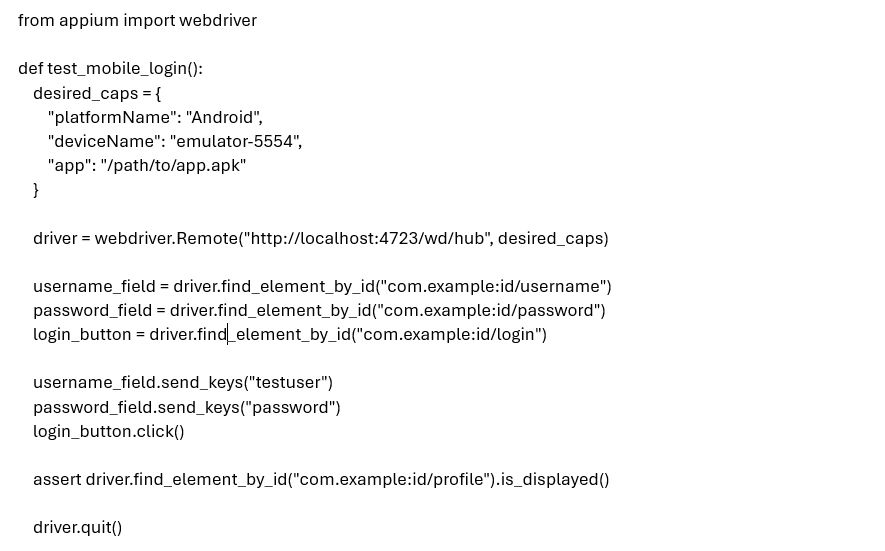
Let’s say you need to automate tests for a mobile application. You might consider tools like Appium, Espresso, and XCUITest. Conducting a POC can help you determine the best fit.
- Appium: Supports both Android and iOS, integrates well with Selenium, and allows for writing tests in multiple programming languages.
- Espresso: Specifically for Android, provides faster test execution, and integrates well with Android Studio.
- XCUITest: Specifically for iOS, provides faster test execution, and integrates well with Xcode.
By conducting a POC, you find that Appium is the best choice for your team because it allows you to write tests for both Android and iOS using the same framework, leveraging existing Selenium knowledge.
Conclusion
QA automation, when done right, can significantly enhance the efficiency and effectiveness of your testing process. By knowing what to automate, designing with sustainability and reusability in mind, writing clean code, and choosing the right tool, you can build a robust automation framework that delivers consistent and reliable results. The key to successful QA automation lies in careful planning, execution, and continuous improvement.